<?xml version="1.0" encoding="utf-8"?>
<feed xmlns="http://www.w3.org/2005/Atom">

  <title><![CDATA[retronerd]]></title>
  <link href="http://retronerd.com/atom.xml" rel="self"/>
  <link href="http://retronerd.com/"/>
  <updated>2014-10-10T16:45:23-07:00</updated>
  <id>http://retronerd.com/</id>
  <author>
    <name><![CDATA[John Cook]]></name>
    
  </author>
  <generator uri="http://octopress.org/">Octopress</generator>

  
  <entry>
    <title type="html"><![CDATA[A Programming Revolution]]></title>
    <link href="http://retronerd.com/blog/2013/02/12/a-programming-revolution/"/>
    <updated>2013-02-12T11:50:00-08:00</updated>
    <id>http://retronerd.com/blog/2013/02/12/a-programming-revolution</id>
    <content type="html"><![CDATA[<p><img src="http://retronerd.com/assets/images/cook-revolution.jpg"></p>

<p>OK, there&rsquo;s no programming revolution, but a <a href="https://twitter.com/bakes">friend of mine</a> made this fantastic picture of me back in the crazy beard days and I had to share.</p>
]]></content>
  </entry>
  
  <entry>
    <title type="html"><![CDATA[The World of Python]]></title>
    <link href="http://retronerd.com/blog/2013/02/09/the-world-of-python/"/>
    <updated>2013-02-09T18:34:00-08:00</updated>
    <id>http://retronerd.com/blog/2013/02/09/the-world-of-python</id>
    <content type="html"><![CDATA[<p><img class="center" src="http://retronerd.com/assets/images/world-of-python.png"></p>

<p>When I <a href="http://code.google.com/edu/languages/google-python-class/">first started learning Python</a>, I quickly became a fan of the syntax.  Tuples, dictionaries and list comprehensions are some cool language features that remove a lot of boilerplate.  But as I waded into existing projects I kept running into environmental concepts like eggs, easy_install, pip, virtualenv and other scaffolding that have nothing to do with the language per se, but I needed to know to do anything useful with it.</p>

<p>However I couldn&rsquo;t find any overview of this Python ecosystem that I needed to navigate.</p>

<!-- more -->


<p>It&rsquo;s easy to start grumbling, &ldquo;this Python thing is a disorganized mess&rdquo;, but I recognized that if someone were to walk into a world I already know quite well they would be just as lost.  A Java newbie might rightly ask:</p>

<blockquote><p>What is a class path?<br/>What is a JAR?<br/>An EAR?<br/>Wait, who declared WAR?<br/>Why would I want to use Ant or Maven or Ivy?</p><footer><strong>-A Java newbie</strong></footer></blockquote>


<p>So I took a step back and did a survey of the land.  And here&rsquo;s what I found.</p>

<h2>Package Management</h2>

<p>Of course you want to get all the cool libraries that people are writing.  But how do you get them?</p>

<h3>First of All, Eggs</h3>

<p>An egg is a distribution of a Python package.  Eggs are similar to <a href="http://en.wikipedia.org/wiki/JAR_(file_format">Java JARs</a> but have more in common with <a href="http://docs.rubygems.org/read/chapter/1#page22">Ruby gems</a>, as eggs support declaring dependencies and defining multiple entry points.</p>

<h4>Built Eggs</h4>

<p>Built eggs are how you usually get Python packages.  They are typically zip files that contain all the code.  A built egg can also be an un-zipped directory structure and there&rsquo;s a whole <a href="http://peak.telecommunity.com/DevCenter/EggFormats">specification for how it&rsquo;s laid out</a>, but you don&rsquo;t care about that crap for now.</p>

<h4>Development Eggs</h4>

<p>A development egg is an in-place installation of an egg, for when you are working on an egg.  It&rsquo;s just a normal directory of Python code with some <code>ProjectName.egg-info</code> subdirectories.</p>

<h4>Egg Links</h4>

<p>Egg links are pointers to where the real egg is on the filesystem.  They only exist to support platforms which do not have native symbolic links (ahem, Windows).  They are <code>*.egg-link</code> files that contain the name of a built or development egg.</p>

<h3>Loading Installed Eggs</h3>

<p>So now you know what an egg is.  Well damn, it&rsquo;s basically just a bunch of Python code!  So let me download some and get to work!  Hold on there, tiger.  First you need to know how Python finds these eggs.  It simply looks in the <code>sys.path</code> variable for paths to packages.  But where does this path come from?</p>

<h4>site-packages</h4>

<p>This is the global spot for a Python installation to store packages.  <strong>I&rsquo;d highly recommend not globally installing many things on your system&rsquo;s default Python</strong>, as this really dirties the waters.  More on that later.</p>

<p>If you&rsquo;re curious, you can run this cryptic little bugger to find out where your Python&rsquo;s <code>site-packages</code> directory is located:</p>

<figure class='code'><div class="highlight"><table><tr><td class="gutter"><pre class="line-numbers"><span class='line-number'>1</span>
</pre></td><td class='code'><pre><code class=''><span class='line'>python -c "from distutils.sysconfig import get_python_lib; print get_python_lib()"</span></code></pre></td></tr></table></div></figure>


<h4>PYTHONPATH</h4>

<p>Python also grabs packages from the environment variable <code>PYTHONPATH</code>.  Not much else I can say about that.  Yep.</p>

<h3>Obtaining and Installing Eggs</h3>

<p>OK, now I know how Python finds these eggs.  So where do I get them and how do I install them?  First of all, let me warn you that the single most confusing thing about Python is the state of the package install tools.  But the good news is that Python has a well-maintained central repository.</p>

<h4>Most Eggs are in PyPi</h4>

<p><a href="http://pypi.python.org/pypi">PyPi</a> is short for Python Package Index.  It is the official repository for third-party Python packages.  It is similar to Perl’s <a href="http://www.cpan.org/">CPAN</a> and Java&rsquo;s somewhat less formal <a href="http://search.maven.org/">Apache Maven central repository</a>.</p>

<p><em>Do not confuse this with <a href="http://pypy.org/">PyPy</a>!  PyPy is an implementation of Python written in (surprise!) Python.</em></p>

<h4>Old School Package Installation: easy_install from the setuptools Project</h4>

<p>For the longest time everybody just used <code>easy_install</code> to download and install their packages.  <code>easy_install</code> is part of the setuptools project by the ubiquitous <a href="http://dirtsimple.org/programming/">P.J. Eby</a>.  But people started wanting newer features and I think Mr. Eby just didn&rsquo;t have the time to dedicate to a bunch of new work.  So setuptools got forked.</p>

<h4>New School Package Installation: pip from the Distribute Project</h4>

<p>The setuptools project was forked into the Distribute project. Now most people use <code>pip</code> instead of <code>easy_install</code>.  I&rsquo;ll let the guys who wrote <code>pip</code> <a href="http://www.pip-installer.org/en/latest/other-tools.html#pip-compared-to-easy-install">explain why</a>:</p>

<blockquote><p>pip was originally written to improve on easy_install in the following ways:</p>

<ul>
<li>All packages are downloaded before installation. Partially-completed installation doesn’t occur as a result.</li>
<li>Care is taken to present useful output on the console.</li>
<li>The reasons for actions are kept track of. For instance, if a package is being installed, pip keeps track of why that package was required.</li>
<li>Error messages should be useful.</li>
<li>The code is relatively concise and cohesive, making it easier to use programmatically.</li>
<li>Packages don’t have to be installed as egg archives, they can be installed flat (while keeping the egg metadata).</li>
<li>Native support for other version control systems (Git, Mercurial and Bazaar)</li>
<li>Uninstallation of packages.</li>
<li>Simple to define fixed sets of requirements and reliably reproduce a set of packages.</li>
</ul>


<p>pip doesn’t do everything that easy_install does. Specifically:</p>

<ul>
<li>It cannot install from eggs. It only installs from source. (In the future it would be good if it could install binaries from Windows .exe or .msi – binary install on other platforms is not a priority.)</li>
<li>It is incompatible with some packages that extensively customize distutils or setuptools in their setup.py files.</li>
</ul>
</blockquote>

<h2>Using Eggs Without Getting Egg All Over Your Python</h2>

<h3>Buildout</h3>

<p><a href="http://www.buildout.org/">Buildout</a>.  What is it?  Alright, the name makes it sound like a build tool, but it&rsquo;s not really.  It&rsquo;s a way to &ldquo;build out&rdquo; a development environment for a project.  It&rsquo;s really good at:</p>

<ul>
<li>Fetching all the dependencies for a project</li>
<li>Keeping those dependencies out of your system Python</li>
<li>Creating a <code>python</code> script that includes the paths for your project dependencies along with your project code so you don&rsquo;t need to poison your system Python</li>
</ul>


<p>It does a lot of other stuff, but start thinking of it that way and not necessarily like <code>make</code> or <code>rake</code> or Ant/Maven.</p>

<h3>Virtualenv</h3>

<p>So let&rsquo;s say you want to play around with some packages but not necessarily setup a project and declare a bunch of dependencies and stuff.  Dammit, you want to use <code>pip</code>!  Enter <a href="http://www.virtualenv.org/en/latest/">virtualenv</a>.</p>

<p>All virtualenv does is copy your Python executable somewhere safe and create an isolated <code>site-packages</code> directory so <code>easy_install</code> and <code>pip</code> will keep their dirty mitts out of it.  That way you can play around and if something gets all screwed up, you can just blow away your virtual environment and start over.</p>

<p>Oddly enough, to use virtualenv, you&rsquo;ll need to <code>pip install virtualenv</code> to your system Python.  <strong>I know</strong>, that&rsquo;s kind of hypocritical.  Deal with it.</p>

<p>I highly recommend using a set of helper scripts called <a href="http://www.doughellmann.com/projects/virtualenvwrapper/">virtualenvwrapper</a> for creating and using Python virtual environments.</p>

<h2>And That&rsquo;s It</h2>

<p>I hope this helps clear the way for you a little bit.  If I&rsquo;ve made any errors, please add a comment and let me know!</p>
]]></content>
  </entry>
  
  <entry>
    <title type="html"><![CDATA[PyPi Cache]]></title>
    <link href="http://retronerd.com/blog/2012/04/30/pypi-cache/"/>
    <updated>2012-04-30T17:42:00-07:00</updated>
    <id>http://retronerd.com/blog/2012/04/30/pypi-cache</id>
    <content type="html"><![CDATA[<p><img class="center" src="http://retronerd.com/assets/images/pi-pie.jpg"></p>

<h2>The Problem</h2>

<p>Not many things are more annoying than a build failure that is nobody’s fault:</p>

<figure class='code'><div class="highlight"><table><tr><td class="gutter"><pre class="line-numbers"><span class='line-number'>1</span>
<span class='line-number'>2</span>
<span class='line-number'>3</span>
<span class='line-number'>4</span>
<span class='line-number'>5</span>
<span class='line-number'>6</span>
<span class='line-number'>7</span>
<span class='line-number'>8</span>
<span class='line-number'>9</span>
<span class='line-number'>10</span>
<span class='line-number'>11</span>
<span class='line-number'>12</span>
</pre></td><td class='code'><pre><code class=''><span class='line'>[exec] Getting distribution for 'MarkupSafe&gt;=0.9.2'.
</span><span class='line'>[exec]
</span><span class='line'>[exec] An internal error occurred due to a bug in either zc.buildout or in a
</span><span class='line'>[exec] recipe being used:
</span><span class='line'>[exec] Traceback (most recent call last):
</span><span class='line'>[exec] File "/mnt/buildout-caches/eggs/zc.buildout-1.5.2-py2.7.egg/zc/buildout/buildout.py", line 1805, in main
</span><span class='line'>...
</span><span class='line'>[exec] File "/usr/lib/python2.7/socket.py", line 447, in readline
</span><span class='line'>[exec] data = self._sock.recv(self._rbufsize)
</span><span class='line'>[exec] timeout: timed out
</span><span class='line'> 
</span><span class='line'> BUILD FAILED</span></code></pre></td></tr></table></div></figure>


<p>The <strong>code</strong> is fine, but our build depends on a website that we don&rsquo;t control!</p>

<!-- more -->


<p>We use <a href="http://jenkins-ci.org/">Jenkins</a> for our automated builds which runs <a href="http://www.buildout.org/">Buildout</a> to assemble our project for deployment.  Buildout checks the <a href="http://pypi.python.org/pypi">PyPi index</a> for any new packages that are needed or any new versions for packages that are not version-pinned.  So if PyPi is unavailable (or very slow) for a while, our build fails.  That sucks because Jenkins won’t try another build until it detects a new changelist in our repository.</p>

<h2>The Solution</h2>

<p>I started looking into how we could cache PyPi locally to avoid this problem altogether.  I found <a href="http://www.apache.org/info/mirror-proxy.html">several</a> <a href="http://pypi.python.org/pypi/pep381client">ways</a> to <a href="http://pypi.python.org/pypi/z3c.pypimirror">achieve</a> <a href="http://yopypi.googlecode.com/hg/docs/build/html/index.html">this</a>, but finally settled on <a href="http://pypi.python.org/pypi/collective.eggproxy">collective-eggproxy</a>.  I mainly chose it for 2 reasons:
1. It doesn’t cache/sync all 30+ gigs of PyPi
2. We already have an Apache instance and it can be ran as a mod_python module
I ran into a couple of installation and configuration problems so I thought I’d share our setup.</p>

<h3>Installation</h3>

<h4>Eggy Parts</h4>

<p>BeautifulSoup is an awesome HTML/XML parser but whoever manages their index on PyPi has the wrong links.  I’ve seen a couple of packages that rely on BeautifulSoup versions &lt;= 3.09, but those seem to fail.  I finally figured out that adding a find-links hint to easy_install fixed me right up:</p>

<figure class='code'><figcaption><span></span></figcaption><div class="highlight"><table><tr><td class="gutter"><pre class="line-numbers"><span class='line-number'>1</span>
</pre></td><td class='code'><pre><code class='bash'><span class='line'>easy_install -f http://www.crummy.com/software/BeautifulSoup/download/ collective.eggproxy
</span></code></pre></td></tr></table></div></figure>


<p>Note that I’m just installing it in the system Python site-packages.  You could use a virtualenv, but this is just our CI server.</p>

<h4>mod_python</h4>

<p>I use Ubuntu so I got mod_python via apt:</p>

<figure class='code'><figcaption><span></span></figcaption><div class="highlight"><table><tr><td class="gutter"><pre class="line-numbers"><span class='line-number'>1</span>
</pre></td><td class='code'><pre><code class='bash'><span class='line'>sudo apt-get install libapache2-mod-python
</span></code></pre></td></tr></table></div></figure>


<h3>Configuration</h3>

<h4>collective.eggproxy</h4>

<p>In /etc/eggproxy.conf I used:</p>

<figure class='code'><figcaption><span></span></figcaption><div class="highlight"><table><tr><td class="gutter"><pre class="line-numbers"><span class='line-number'>1</span>
<span class='line-number'>2</span>
<span class='line-number'>3</span>
<span class='line-number'>4</span>
<span class='line-number'>5</span>
<span class='line-number'>6</span>
</pre></td><td class='code'><pre><code class='python'><span class='line'><span class="p">[</span><span class="n">eggproxy</span><span class="p">]</span>
</span><span class='line'><span class="n">eggs_directory</span> <span class="o">=</span> <span class="o">/</span><span class="n">var</span><span class="o">/</span><span class="n">pypi</span><span class="o">-</span><span class="n">cache</span>
</span><span class='line'><span class="n">index</span> <span class="o">=</span> <span class="n">http</span><span class="p">:</span><span class="o">//</span><span class="n">pypi</span><span class="o">.</span><span class="n">python</span><span class="o">.</span><span class="n">org</span><span class="o">/</span><span class="n">simple</span>
</span><span class='line'><span class="n">update_interval</span> <span class="o">=</span> <span class="mi">24</span>
</span><span class='line'><span class="n">always_refresh</span> <span class="o">=</span> <span class="mi">0</span>
</span><span class='line'><span class="n">timeout</span> <span class="o">=</span> <span class="mi">3</span>
</span></code></pre></td></tr></table></div></figure>


<h4>Apache</h4>

<p>I added a dedicated virtualhost to Apache like so:</p>

<figure class='code'><figcaption><span></span></figcaption><div class="highlight"><table><tr><td class="gutter"><pre class="line-numbers"><span class='line-number'>1</span>
<span class='line-number'>2</span>
<span class='line-number'>3</span>
<span class='line-number'>4</span>
<span class='line-number'>5</span>
<span class='line-number'>6</span>
<span class='line-number'>7</span>
<span class='line-number'>8</span>
<span class='line-number'>9</span>
<span class='line-number'>10</span>
<span class='line-number'>11</span>
<span class='line-number'>12</span>
<span class='line-number'>13</span>
<span class='line-number'>14</span>
<span class='line-number'>15</span>
</pre></td><td class='code'><pre><code class='apache'><span class='line'><span class="nt">&lt;VirtualHost</span> <span class="s">*:80</span><span class="nt">&gt;</span>
</span><span class='line'>    <span class="nb">ServerName</span> pypi-cache.hostname.tld
</span><span class='line'>    <span class="nb">Alias</span> <span class="sx">/pypi</span> <span class="s2">&quot;/var/pypi-cache&quot;</span>
</span><span class='line'>    <span class="nt">&lt;Directory</span> <span class="s">&quot;/var/pypi-cache&quot;</span><span class="nt">&gt;</span>
</span><span class='line'>        <span class="nb">Order</span> allow,deny
</span><span class='line'>        <span class="nb">Allow</span> from <span class="k">all</span>
</span><span class='line'>        <span class="nb">SetHandler</span> mod_python
</span><span class='line'>        <span class="nb">PythonFixupHandler</span> collective.eggproxy.apache_handler::fixup_handler
</span><span class='line'>        <span class="nb">PythonInterpreter</span> main_interpreter
</span><span class='line'>        <span class="nb">PythonOption</span> URLPrefix <span class="sx">/pypi</span>
</span><span class='line'>    <span class="nt">&lt;/Directory&gt;</span>
</span><span class='line'>    <span class="nb">LogLevel</span> <span class="k">warn</span>
</span><span class='line'>    <span class="nb">ErrorLog</span> ${APACHE_LOG_DIR}/pypi-cache.error.log
</span><span class='line'>    <span class="nb">CustomLog</span> ${APACHE_LOG_DIR}/pypi-cache.access.log combined
</span><span class='line'><span class="nt">&lt;/VirtualHost&gt;</span>
</span></code></pre></td></tr></table></div></figure>


<h4>Buildout</h4>

<p>In our project’s buildout.cfg I simply had to add:</p>

<figure class='code'><figcaption><span></span></figcaption><div class="highlight"><table><tr><td class="gutter"><pre class="line-numbers"><span class='line-number'>1</span>
</pre></td><td class='code'><pre><code class='python'><span class='line'><span class="n">index</span> <span class="o">=</span> <span class="n">http</span><span class="p">:</span><span class="o">//</span><span class="n">pypi</span><span class="o">-</span><span class="n">cache</span><span class="o">.</span><span class="n">hostname</span><span class="o">.</span><span class="n">tld</span><span class="o">/</span><span class="n">pypi</span><span class="o">/</span>
</span></code></pre></td></tr></table></div></figure>


<h2>Conclusion</h2>

<p>This has worked out great for us.  Not only are our builds more stable, but there’s a noticeable speed improvement.  Totally worth it!</p>
]]></content>
  </entry>
  
  <entry>
    <title type="html"><![CDATA[Cloud Penguins]]></title>
    <link href="http://retronerd.com/blog/2012/03/13/cloud-penguins/"/>
    <updated>2012-03-13T18:09:00-07:00</updated>
    <id>http://retronerd.com/blog/2012/03/13/cloud-penguins</id>
    <content type="html"><![CDATA[<p><img class="center" src="http://retronerd.com/assets/images/flying-penguin.png" title="Photo credit to jbliss2006 from worth1000.com" ></p>

<p>This weekend I was tasked with setting up a new <a href="http://jenkins-ci.org/">Jenkins</a> server on EC2.  I’ve used a server built from <a href="http://aws.amazon.com/amazon-linux-ami/">Amazon’s official Linux AMI</a> before and was happy enough with it.  So I went that route.  But it didn&rsquo;t end very well&hellip;</p>

<!-- more -->


<p>I did the typical wrestling with Apache, Tomcat and SSL configuration.  Our project uses Python 2.7 and when the first test build failed I was a bit surprised that it wasn’t installed.  I confidently typed
<code>sudo yum install python27</code>
but there was no package for me.  Python 2.7 was released almost 2 years ago at this point, what the hell?  I searched and searched for a yum repo but there was none.</p>

<p>Very reluctantly I installed Python 2.7 from source.  No, I’m not allergic to configure and make, but I like the ability to upgrade everything with one shot.  Programmers typically make terrible system administrators so I don’t need yet another thing to remember about this server.  But whatever, I installed it and went on with my life.</p>

<p>Our project also uses Ant.  When the second test build failed I learned that we specifically require Ant 1.8 and the latest available from the Amazon yum repository is 1.7.  Now this is a bit ridiculous, 1.8 was released <strong>over 2 years ago</strong>.  Even though it was past 2am at this point, I decided to kick this installation to the curb.</p>

<p>I chose <a href="https://help.ubuntu.com/community/EC2StartersGuide">Ubuntu’s Cloud Guest AMI</a>, and it’s brilliant.  Most of the defaults are exactly what I’d choose.  And by golly, they have packages for Python 2.7 and Ant 1.8.  There’s even a package with <a href="http://packages.ubuntu.com/oneiric/jenkins-tomcat">Jenkins on Tomcat</a> for me (oh and look at that, they have a package browser on the web, how clever).</p>
]]></content>
  </entry>
  
  <entry>
    <title type="html"><![CDATA[iTunes U Rocks]]></title>
    <link href="http://retronerd.com/blog/2011/06/18/itunes-u-rocks/"/>
    <updated>2011-06-18T00:09:00-07:00</updated>
    <id>http://retronerd.com/blog/2011/06/18/itunes-u-rocks</id>
    <content type="html"><![CDATA[<p><img class="center" src="http://retronerd.com/assets/images/itunes-grad.png"></p>

<p>On the side I&rsquo;ve just started helping out on a fun iOS project.  iPhone development is one of those things that I&rsquo;ve been meaning to do for literally 2 years now.  Finally getting that off the ground feels good.</p>

<p>Being one of those people who prefers instructor-lead learning over a book any day, I was thrilled to find that Stanford offers CS 193P iPhone Application Development via iTunes U for absolutely free.  They even provide the <a href="http://cs193p.stanford.edu/">course materials</a> for free.</p>

<p>While it rained on a Saturday, I was able to &ldquo;attend&rdquo; the first week of classes and am busy finishing my homework.  But I had to take a break to give a shout out to Stanford and Apple for providing something so awesome.</p>

<p>Take a look around iTunes U and you&rsquo;ll definitely find something that interests you.  I remember checking it out when Apple first announced it, but it has grown very large since then.</p>
]]></content>
  </entry>
  
  <entry>
    <title type="html"><![CDATA[Serving Up Skin Images From Magento]]></title>
    <link href="http://retronerd.com/blog/2011/02/03/serving-up-skin-images-from-magento/"/>
    <updated>2011-02-03T00:13:00-08:00</updated>
    <id>http://retronerd.com/blog/2011/02/03/serving-up-skin-images-from-magento</id>
    <content type="html"><![CDATA[<p><img class="center" src="http://retronerd.com/assets/images/magento-skin.png">
While integrating a shipping solution with Magento for multiple websites, we needed a way to get a logo for the invoice for each store in a generic way.  The problem is that ShipWorks only knows the store URL and has no knowledge of Magento&rsquo;s skin directory. So I came up with a simple PHP script that sits in the root of the Magento install and handles all the skin sanity (that&rsquo;s right) inside of Magento for me. Enjoy:</p>

<figure class='code'><figcaption><span></span></figcaption><div class="highlight"><table><tr><td class="gutter"><pre class="line-numbers"><span class='line-number'>1</span>
<span class='line-number'>2</span>
<span class='line-number'>3</span>
<span class='line-number'>4</span>
<span class='line-number'>5</span>
<span class='line-number'>6</span>
<span class='line-number'>7</span>
<span class='line-number'>8</span>
<span class='line-number'>9</span>
<span class='line-number'>10</span>
<span class='line-number'>11</span>
<span class='line-number'>12</span>
<span class='line-number'>13</span>
<span class='line-number'>14</span>
<span class='line-number'>15</span>
<span class='line-number'>16</span>
<span class='line-number'>17</span>
<span class='line-number'>18</span>
<span class='line-number'>19</span>
<span class='line-number'>20</span>
</pre></td><td class='code'><pre><code class='php'><span class='line'><span class="o">&lt;?</span><span class="nx">php</span>
</span><span class='line'>  <span class="k">require_once</span> <span class="s1">&#39;app/Mage.php&#39;</span><span class="p">;</span>
</span><span class='line'>  <span class="nv">$mageRunCode</span> <span class="o">=</span> <span class="nb">isset</span><span class="p">(</span><span class="nv">$_SERVER</span><span class="p">[</span><span class="s1">&#39;MAGE_RUN_CODE&#39;</span><span class="p">])</span> <span class="o">?</span> <span class="nv">$_SERVER</span><span class="p">[</span><span class="s1">&#39;MAGE_RUN_CODE&#39;</span><span class="p">]</span> <span class="o">:</span> <span class="s1">&#39;&#39;</span><span class="p">;</span>
</span><span class='line'>  <span class="nx">Mage</span><span class="o">::</span><span class="na">app</span><span class="p">(</span><span class="nv">$mageRunCode</span><span class="p">);</span>
</span><span class='line'>  <span class="nv">$file</span> <span class="o">=</span> <span class="nx">Mage</span><span class="o">::</span><span class="na">getDesign</span><span class="p">()</span><span class="o">-&gt;</span><span class="na">getSkinUrl</span><span class="p">(</span><span class="s1">&#39;images/logo-offline.gif&#39;</span><span class="p">);</span>
</span><span class='line'>
</span><span class='line'>  <span class="c1">//Header</span>
</span><span class='line'>  <span class="nx">header</span><span class="p">(</span><span class="s1">&#39;Content-Type: image/gif&#39;</span><span class="p">);</span>
</span><span class='line'>  <span class="nx">header</span><span class="p">(</span><span class="s1">&#39;Content-Transfer-Encoding: binary&#39;</span><span class="p">);</span>
</span><span class='line'>  <span class="nx">header</span><span class="p">(</span><span class="s1">&#39;Expires: 0&#39;</span><span class="p">);</span>
</span><span class='line'>  <span class="nx">header</span><span class="p">(</span><span class="s1">&#39;Cache-Control: must-revalidate, post-check=0, pre-check=0&#39;</span><span class="p">);</span>
</span><span class='line'>  <span class="nx">header</span><span class="p">(</span><span class="s1">&#39;Pragma: public&#39;</span><span class="p">);</span>
</span><span class='line'>  <span class="nx">header</span><span class="p">(</span><span class="s1">&#39;Content-Length: &#39;</span> <span class="o">.</span> <span class="nb">filesize</span><span class="p">(</span><span class="nv">$file</span><span class="p">));</span>
</span><span class='line'>  <span class="nb">ob_clean</span><span class="p">();</span>
</span><span class='line'>  <span class="nb">flush</span><span class="p">();</span>
</span><span class='line'>
</span><span class='line'>  <span class="c1">//Contents</span>
</span><span class='line'>  <span class="nb">readfile</span><span class="p">(</span><span class="nv">$file</span><span class="p">);</span>
</span><span class='line'>  <span class="k">exit</span><span class="p">;</span>
</span><span class='line'><span class="cp">?&gt;</span><span class="x"></span>
</span></code></pre></td></tr></table></div></figure>

]]></content>
  </entry>
  
  <entry>
    <title type="html"><![CDATA[SimpleDateFormat Will Harm Your Pets]]></title>
    <link href="http://retronerd.com/blog/2010/08/30/simpledateformat-will-harm-your-pets/"/>
    <updated>2010-08-30T00:16:00-07:00</updated>
    <id>http://retronerd.com/blog/2010/08/30/simpledateformat-will-harm-your-pets</id>
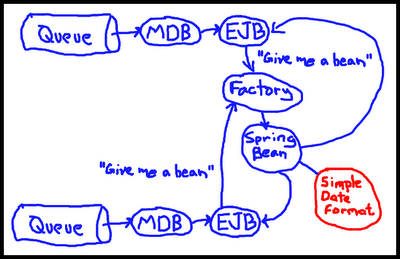
    <content type="html"><![CDATA[<p>Today while researching a production issue I found a concurrency bug when formatting a date. It really wasn&rsquo;t anyone’s glaring fault, it&rsquo;s mainly just an artifact of our still-in-progress transition to Spring. We have an MDB that calls an EJB that calls a Spring-created object which has an object-local variable that is a SimpleDateFormat. The problem is that <a href="http://static.springsource.org/spring/docs/1.2.9/reference/beans.html#beans-factory-modes">by default, Spring beans are singletons</a>. Combine that with the fact that <a href="http://download.oracle.com/javase/6/docs/api/java/text/SimpleDateFormat.html#synchronization">SimpleDateFormat is not thread-safe</a> and hilarity ensues.</p>

<!-- more -->


<p><img class="center" src="http://retronerd.com/assets/images/simpledateformat-diagram.png"></p>

<p>Anyone could have missed that – I even knew something was potentially wrong in the date formatting code and seeing SimpleDateFormat threw up some immediate alarms, but it still took me quite a while to walk the dependency chain and then realize the EJB-transitioning-to-Spring-bean was a singleton.</p>

<p>What I’m getting at is, the problem really isn’t Spring or singletons or that we should flog the programmer who didn&rsquo;t read every line of code in the Spring bean when he was converting it from an EJB. Us Java programmers need to ditch using thread-unsafe classes just like we ditched using pointers and managing memory. These days there’s no good reason to use SimpleDateFormat. It is evil. I’ve seen it kick puppies. Cute ones.</p>

<p><img class="center" src="http://retronerd.com/assets/images/simpledateformat-puppy.png"></p>

<p>The good news is that for date formatting, there is an easy drop-in replacement in Apache’s Commons Lang library called <a href="http://commons.apache.org/lang/api-2.5/org/apache/commons/lang/time/FastDateFormat.html">FastDateFormat</a> that is not only thread-safe, but faster to boot.</p>

<p>If you want to take it a step further (because pretty much anything date-related in the JDK sucks), check out the <a href="http://joda-time.sourceforge.net/">Joda Time API</a>. It can do <a href="http://joda-time.sourceforge.net/userguide.html#Input_and_Output">thread-safe formatting and parsing</a>.</p>

<p>So if you are touching a class and you see a reference to SimpleDateFormat, please consider taking a few minutes to replace it with something better. Think of the puppies.</p>
]]></content>
  </entry>
  
</feed>